

Hearing Audio Through Your TV’s Speaker and Headphones at the Same Time
Hearing audio through the TV speaker AND the headphones at the same time
If you'd like to get sound on both your TV speakers AND headphones at the same time, it DEPENDS on whether the TV is able to support getting sound out to two sources simultaneously. It is NOT related to the transmitter. The transmitter receieves the sound from your TV's output and streams it over to your Bluetooth headphones or speakers.
For TV Built-In Speaker Users:
Solution 1: Change your TV's audio settings
First, check your TV’s settings to see if it supports simultaneous audio. Make sure that your TV’s audio output is set to “Internal TV Speaker + Audio Out (Optical)”. This setting’s name may vary depending on the TV’s brand and model.
If your TV doesn't have this setting, but you connect the transmitter to your TV via OPTICAL port AND you can see the following options under the SOUND OUTPUT settings on your TV...
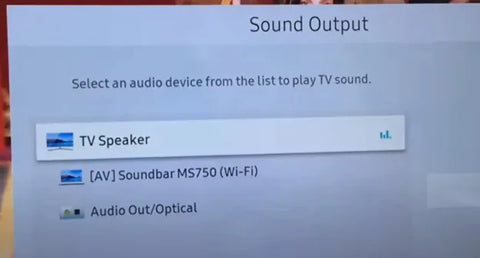
You can actually get sound simultaneously! Follow these steps:
- Go to SOUND OUTPUT and change this to OPTICAL / EXTERNAL SPEAKER
- Once there's sound going out into the headphones, go back to SOUND OUTPUT and change this back to TV SPEAKER
If your TV doesn't support simultaneous output to both the TV speakers and headphones, here are some alternative methods you can consider:
If you use an audio transmitter:
Solution 2: Connect the Transmitter to a TV box / AV Receiver instead
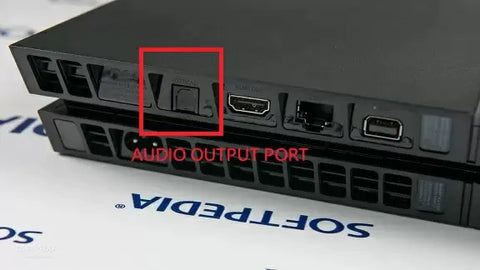
If you have a TV box (DirecTV, Xfinity, Bluray Player, etc.), you should be able to find audio output ports on the back of them. Try to connect the Avantree transmitter directly here instead of the TV. This method essentially allows you to "go around" the TV's built-in speakers.
Con: will not work on streaming apps if you have a Smart TV or streaming device
For External Soundbar Users:
If the previous solutions don't work for you, you'll need to purchase a soundbar, stereo receiver, or external speakers to serve as your TV's speakers, since the TV's speakers won't work with your headphones. In this way, you can have audio coming from the headphones and these external speakers at the same time. Consider: Torpedo Plus
Solution 3: Use a Transmitter with the Passthrough Function
If you have a Soundbar or Stereo Receiver, check your transmitter to see if it supports passthrough. If not, you can return your current product and consider purchasing one of these: Orbit, Oasis Plus, Opera, Medley 6018, HT5009, HT5006, Duet, or Quartet.
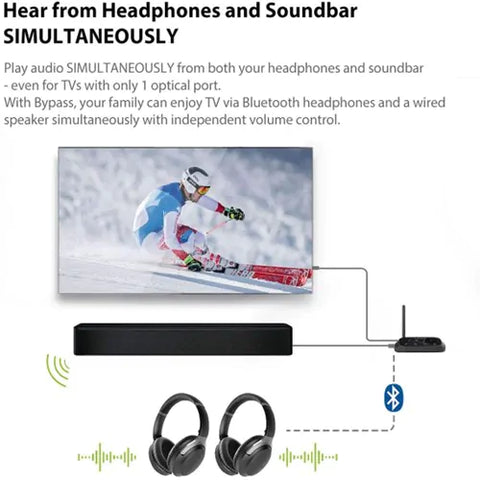
Our industry leading "Passthrough" function allows you to put the transmitter/base between a TV and an external speaker and have audio come out from both devices AT THE SAME TIME.

Solution 4: Use an Audio splitter/extractor
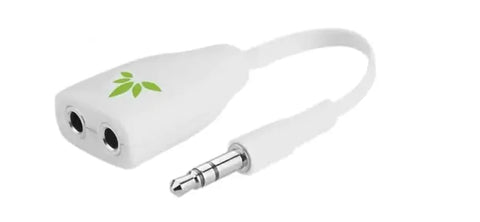
- For AUX Output - Use an audio splitter (e.g. Avantree TR302) to share the TV's audio between an EXTERNAL SPEAKER and the Transmitter. The splitter in this example is a 3.5mm audio splitter
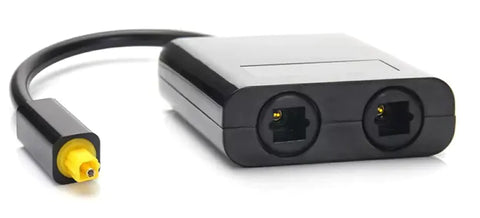
- For Optical AUDIO OUT - Use an optical splitter (e.g. J-Tech splitter) to share the TV's audio between an EXTERNAL SPEAKER and the Transmitter. The splitter in this example is an optical audio splitter.

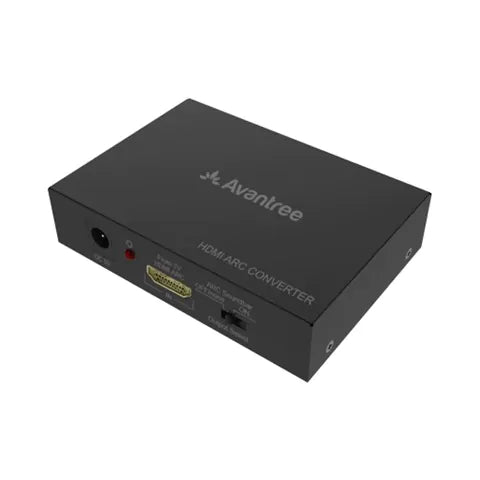
- For HDMI ARC OUT - Use an HDMI Audio Extractor (e.g. HAX05) to share the TV's audio between an EXTERNAL SPEAKER and the Transmitter. The splitter in this example is an ARC supported HDMI audio extractor.
FAQs
Can I hear audio through both my TV speakers and headphones at the same time?
It depends on your TV model. Some TVs support simultaneous audio output to internal speakers and external devices like Bluetooth headphones. Check your TV’s audio settings for options like “Internal TV Speaker + Audio Out (Optical)” or similar to enable dual audio output.
How do I enable simultaneous sound on TV speakers and headphones?
Go to your TV’s sound settings and set the audio output to “Optical/External Speaker.” Once sound plays through the headphones, switch the output back to “TV Speaker.” This trick works on many TVs to allow audio from both sources simultaneously.
What if my TV doesn’t support simultaneous audio output?
You can connect the Bluetooth transmitter to your TV box or AV receiver instead of the TV. This bypasses the TV’s built-in speakers and may allow simultaneous audio on headphones and external speakers connected to the receiver.
Can I use a soundbar and Bluetooth headphones at the same time?
Yes, if your Bluetooth transmitter supports a passthrough or bypass function, you can place it between your TV and soundbar. This lets audio play through both the soundbar and your Bluetooth headphones simultaneously without muting either.
Are there hardware solutions to share audio between speakers and headphones?
Yes, audio splitters or extractors can share audio signals. Use a 3.5mm splitter for AUX output, an optical splitter for digital audio out, or an HDMI audio extractor for HDMI ARC ports to send sound to both external speakers and a Bluetooth transmitter simultaneously.