
C82 Aura
Plug in C82 Aura
- Plug C82 Aura into your device’s USB-C audio port.
DoneWhite light = Ready to joinHearing aids can now find C82 Aura.
If not Check the light →
LEDMFBMulti-function button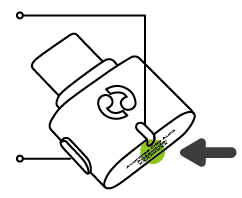
Port and light help
White is the correct light.Orange must be changed to white before hearing aids can join.
WhiteReady to joinOpen your hearing-aid app and select C82 Aura.Ready to search; connection happens after selection.
OrangeHearing aids cannot joinHold the oval side MFB for 6 seconds to switch to white. Then search again.
- USB-A computerUse a compatible USB-A adapter (not included). A charger provides power, not audio.
- No lightReinsert C82 Aura into a powered USB port.