Skip to content

Bluetooth ヘッドフォンを Amazon Fire TV に接続する方法?

by Avantree Support 08 Apr 2024 1 comment

ワイヤレスヘッドフォンでAmazon Fire TVを視聴します。


テレビ ストリーミング デバイスは、テレビ業界で密かに新しいトレンドとなっており、Amazon Fire TV シリーズは、特に米国市場でより成功した例の 1 つです。

電子商取引大手 Amazon の支援を受けています。com、Fire TV では、たくさんのエンターテイメントの選択肢が提供されます…Netflix、Amazon Prime (当たり前!) HBO Max、Hulu など…あらゆる種類の楽しみが揃っています。

残念ながら、耳がよくないために、あまり楽しむことができない人もいます。私たちが素晴らしいアベンジャーズのサウンドトラックにどっぷりと浸っている間、彼らは何が起こっているのか理解するのにさえ苦労しているかもしれません。

では、どうすれば彼らを助けることができるでしょうか?

幸いなことに、方法はあります。 テレビの音量を十分に大きくすることはできませんが、「音を近づける」ことはできます。"

私たちが話しているソリューションは、テレビ用ヘッドフォン、Bluetooth です。正確にはテレビ用ヘッドフォン

Bluetooth ヘッドフォンを通じてテレビを聞くと、テレビのスピーカーを大音量で鳴らすことなく、テレビの音がよく聞こえるようになります。 さらに、Bluetooth ヘッドフォンはワイヤレスであるため、ユーザーは自由に歩き回ることができ、誰もワイヤーにつまずくことはありません…なぜなら、ワイヤーがないからです!


この記事では、Amazon Fire TV で Bluetooth ヘッドフォンを使用するさまざまな方法を紹介します。

1. Amazon Fire Stick、Fire Cube、Fire Blaster – 直接接続します。

2. Bluetooth トランスミッター アダプターを使用して接続します (最大 2 つのヘッドフォンを接続)。

3. テレビの内蔵 Bluetooth を使用して接続します (テレビに Bluetooth が搭載されている場合)。
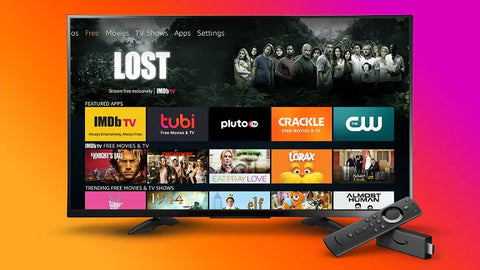
Connect Wireless Headphones to Fire TV


方法 1: Fire TV Steaming デバイスに直接接続します。


Amazon Fire TV Stick と Fire TV Cube の新しいモデルにはすべて Bluetooth 機能が搭載されており、1 組の Bluetooth ヘッドフォンを接続できます。

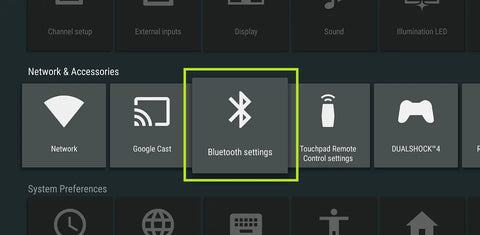
Bluetooth オプション メニューにアクセスするには、メイン ホームページから:

設定 > コントローラーと Bluetooth デバイス > その他の Bluetooth デバイス。
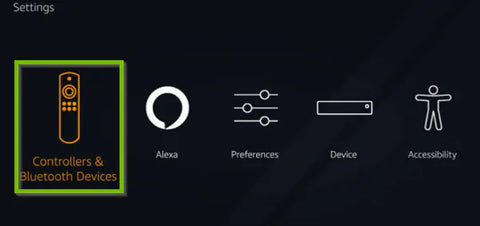
How to Connect Bluetooth Devices to Amazon Fire TV


Bluetooth ヘッドフォンを Bluetooth ペアリング モードにすると、検出されたデバイス リストに表示され、選択できるようになります。それを接続します。

これはおそらく最も簡単で簡単な方法であり、テレビのスピーカーをミュートすることはありません

ただし、この方法を使用すると、Fire TV のコンテンツのみがヘッドフォンに送信されます。テレビにコンテンツを入力する別のデバイス (Blu-Ray プレーヤー またはケーブル ボックスなど) がある場合、ヘッドフォンは機能しません。

また、Amazon Fire Stick (または Cube) では、一度に 1 組のヘッドフォンしか接続できません。 2 つのヘッドフォンを同時に接続する場合は、方法 2 を使用する必要があります。


方法 2: Bluetooth トランスミッター アダプターを使用して接続します (最大 2 つのヘッドフォンを接続します)。


方法 2 は、テレビに音声出力ポートが機能していれば、スマート テレビ、非スマート テレビ、フラットスクリーン、OLED など、どのテレビでも使用できます。

また、これは Fire TV を内蔵したテレビ (例:g インシグニアとか東芝とか。)

Bluetooth アダプター は簡単に見つけて購入できます。 それらは次のようになります:
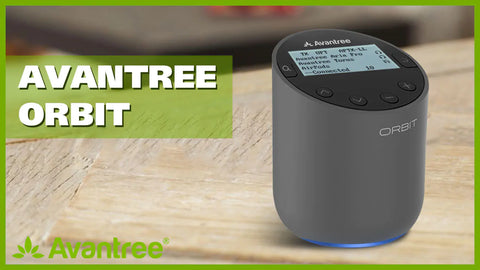
 Bluetooth Adapter for Connecting Bluetooth Headphones to Tv

Bluetooth 5.0 Adapter for Connecting Wireless Headphones to any TV


Bluetooth アダプターを使用すると、基本的に Bluetooth 機能をテレビに追加し、Bluetooth TV ヘッドフォンやスピーカーをテレビに接続できます。

Bluetooth トランスミッターを使用するその他の利点は次のとおりです。

  • a. 2 つの Bluetooth ヘッドフォン/スピーカーを同時に接続できます。
  • b. aptX 低遅延をサポートするヘッドフォンを使用すると、音声の遅延はありません。
  • c. 一部のモデルでは、ヘッドフォン (送信機とペアリングされている) と外部 TV スピーカーを介した 同時オーディオ出力 もサポートしています。これにより、オーディオ出力ジャックに何かが接続されていると、一部のテレビが自動的にミュートになる問題。


Bluetooth アダプタのセットアップ は非常に簡単です。Bluetooth アダプタをテレビのオーディオ出力ポートに接続します。 、Bluetooth Bluetooth ヘッドフォンをアダプターに「ペアリング」します。

この手順が難しい場合は、メーカーによっては ヘッドフォン + アダプター コンボ を提供して簡単にできるようにしています。

このような組み合わせを使用すると、アダプターとヘッドフォンを別々に購入する手間が省けるだけでなく、ヘッドフォンとアダプターをペアリングするという悪名高い手順も省略できます。

さらに、ご家庭にヘッドフォンの助けが必要な方がいる場合に備えて、デュアル ワイヤレス ヘッドフォン モデル が利用可能で、パートナーと体験を共有できます。

ただし、2 組以上のヘッドフォンを接続する場合は、別の解決策を使用する必要があります。 3 ペア以上のヘッドフォンを 1 つのソースに接続する方法を参照してください。
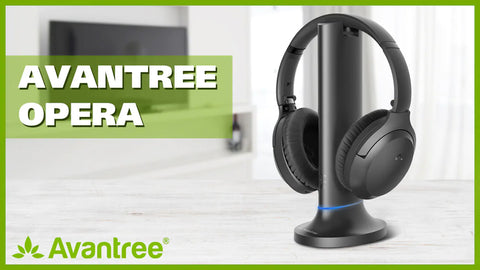


Bluetooth ヘッドフォン + アダプター セット

iWireless Headphones for Smart TV


デュアルワイヤレスヘッドフォン + アダプターセット
Two Headphones on One TV


Fire TV ヘッドフォンから音が出ない場合は、次のトラブルシューティングをお試しください: Amazon Fire TV の音が出ない場合の対処法?


方法 3: テレビの内蔵 Bluetooth を使用して接続します (テレビに Bluetooth が搭載されている場合)。


テレビに Bluetooth が内蔵されている場合は、設定メニューで見つけることができます。 そこにある場合は、ヘッドフォンを Bluetooth ペアリング モードにして、テレビの Bluetooth メニューで見つける必要があります。 表示されたら、メニューで選択して接続します。
TV with Bluetooth Built-in


これが必要なものかどうかまだわからない場合は、 support@avantree.com までお気軽にお問い合わせください。 、私たちは全力を尽くしてお手伝いいたします。


次の項目にも興味があるかもしれません:

テレビ用デュアル ワイヤレス ヘッドフォン


Bluetooth オーディオの遅延を修正する方法。


テレビに最適なヘッドフォンは何ですか?


サウンド バー/外部スピーカーと一緒に Bluetooth ヘッドフォンを使用する

Prev Post
Next Post

1 comment

22 Apr 2025 Lynne Petherick
Had blue tooth headphones for dad’s Fire Tv in the nursing home. Never worked last pair we had were Sony with Alexa built in and they would unpair every time you charged them or turned them off for the night. The sound was controlled by a volume dial that was difficult of him to see and manipulate. I had to put tape on power button etc. He doesn’t know how to pair things, use settings or even apps. I was told by someone at Amazon to get the Avantree HT5009 Plus – [2025 Upgraded] Bluetooth 5.3 Wireless Headphones for TV Watching with Transmitter & Charging Dock, Pass-Through Support, Clear Voice Mo for him. Two hours on the phone. Then a girl said they won’’t work and have to be paired every time charged or turned off and on. Just the way blue tooth is with Fire TV 4K 2024 release. I know nothing about tech but don’t think this should be the case. She said would have to get wired head phones. Can’t have long cord running across floor of nursing home. Hazzard. He likes a charging dock and not the plug in because he can’t see the hole to plug it in. He wants the dock by his bedside table because it is hard for him to reach up to the dresser to put the head phones on to charge if it is on dresser underneath table. Would like them on his bedside table. I had too many Amazon devices going and computer programer told me to get rid of speakers etc and watch TV from apps on TV and put music on Amazon music so don’t have to keep pairing and unpairing which he cannot do. We have went through 4 sets of headphones already. Amazon says they have very few options that are compatible with the Fire TV. Isn’t that ridiculous. I only got that TV because of Alexa voice control because dad can’t see very well and wanted him to control it with his voice. Alexa is not turning up the volume or going to program he wants because he cannot see the buttons or the directional circle and select button. I put tape on those as well. Amazon Accessibility takes no responsibility for a company with so much money not having accessible products for the disabled and elderly. I was wondering if the headphones suggested above by an Amazon manager will work with Fire TV?? After 2 hours on the phone I thought he must know what he his talking about. Then a girl told me they had to be wired to work. I explained in a nursing home a cord running across the floor is not permitted. They would not price match or offer any type of discount after all the trouble we have had trying to get an 84 year old his first pair of headphones, first smart TV and he knows nothing about apps. He is having real trouble trying to run the TV himself. Can’t believe Amazon has hardly any headphones that are compatible with the Fire Tv and Alexa. Would rather not buy from them if don’t have to. Don’t trust they know what they are talking about. I would like the on/off buttons to be large and easy to see. I will pair them for him but don’t think they should be repaired every time they are charged and turned off for the night. I had got the pop speaker so he could save some music but this didn’t work because had to repair every time used different device. Going to pair headphones to TV so he can watch programs and put Music on Amazon music so they should stay paired to one device. Would like the volume button or buttons easy to see and big enough for his large hands numbed by years of work to be able to be felt and be easily accessible. He can’t see well at all and are waiting for appointment with low vision therapist to get some visual aids. He says he won’t read but I wondered if he got a tablet or kindle he could make the print large to see it or maybe an audio book> I guess headphones would have to be repaired in this instance and he does not know how to get into settings let alone pair. I want him to be able to watch his Western movies and listen to his country classic music and if lucky get him to read or listen to a book. Could you please tell me with a definate answer whether theses headphones will work with a Fire TV 4K 2024 realease. Amazon doesn’t seem to know. I would buy them from you but worried about the return if needed and not haveng a free return label. That is how Amazon gets you. I am thoroughly disgusted with Amazon and spoken or yelled at so many managers and supervisors that I threatened to take the whole system off the wall and return the whole system. They even sent the return labels past the return window date. Samsung has better accessibility features but the remote is even smaller and there are no larger universal remotes with voice control. Would someone at your company please give me an informed answer please. I have to order the headphones today as I returned the Sony after a big fight with Amazon and Sony so dad has no headphones at all. I am sure you can see the difficulty of the situation because I don’t know much about tech so am really not help to him. I am so angry after all Amazon has put us through since we bought the Fire Tv and the voice remote pro I am still tempted to take it off the wall and return it. But in reality there is no other option. Alexa won’t even turn the volume up and down now. I wanted him to have an enjoyable time to watch Westerns or listen to music it pass the time and tune out his revolting neighbour. I have no idea how to make this any easier for him. I am hoping the low vision therapist can put some dots or something on headphones and remotes that won’t fall off becaue blind people use them. Don’t know if brand alone matters to being compatible with Fire TV or if it has to be compatible with Alexa too?? I wish you were able to answer all my questions because I am sick of talking to the people at Amazon who either don’t know what they are talking about or each person has a different answer. I am asking for help for a reason or I would choose them myself. The only other reason to order from Amazon if I have to because they will come through the Canadian division so if have to return get a return label for free in Canada. Most companies are American so returning would be expensive and such a hassle. I would love some advice please ASAP because I need to order them in the next couple of hours. I don’t even think they will take a coupon. I am at the end of my rope and don’t know what to do? Could you please help me. Lynne Petherick lynepetherick@gmail.com 613-847-2490 Please let me know as quickly as you can. I have to order them in the next couple of hours.

Leave a comment

All blog comments are checked prior to publishing

Thanks for subscribing!

This email has been registered!

Shop the look

オプションを選択します

Edit Option
Back In Stock Notification
this is just a warning
Login
Shopping Cart
0 items