Vai al contenuto

Come collegare le cuffie Bluetooth ad Amazon Fire TV?

di Avantree Support 08 Apr 2024 1commento

Guarda Amazon Fire TV con le cuffie wireless.


I dispositivi di streaming TV sono diventati silenziosamente una nuova tendenza nel settore televisivo, e la serie Amazon Fire TV è uno degli esempi di maggior successo, soprattutto nel mercato degli Stati Uniti.

Supportato dal colosso dell'e-commerce Amazon.com, Fire TV offre tantissime scelte di intrattenimento... Netflix, Amazon Prime (DUH!) HBO Max, Hulu ecc... tutti i tipi di divertimento.

Sfortunatamente, alcune persone non riescono a goderselo altrettanto bene perché non riescono a sentire bene; mentre siamo completamente immersi nella fantastica colonna sonora degli Avengers, potrebbero avere difficoltà anche solo a capire cosa sta succedendo.

Quindi, come possiamo aiutarli?

Fortunatamente esiste un modo. Non possiamo alzare il volume della TV abbastanza, ma POSSIAMO "Portare l'audio PIÙ VICINO."

La soluzione di cui stiamo parlando sono le Cuffie per TV, Cuffie Bluetooth per TV per l'esattezza.

Ascoltando la TV tramite un paio di cuffie Bluetooth, l'utente sarà in grado di ascoltare meglio la TV senza dover alzare il volume degli altoparlanti della TV. Inoltre, poiché le cuffie Bluetooth sono wireless, l'utente PUÒ camminare liberamente e nessuno verrà inciampato nel cavo... perché non ce n'è!


In questo articolo presenteremo i diversi modi di utilizzare le cuffie Bluetooth con Amazon Fire TV.

1. Amazon Fire Stick, Fire Cube, Fire Blaster: connettiti direttamente.

2. Connettiti utilizzando un adattatore per trasmettitore Bluetooth (connetti fino a DUE cuffie).

3. Connettiti utilizzando il Bluetooth integrato della tua TV (SE la tua TV ne è dotata).
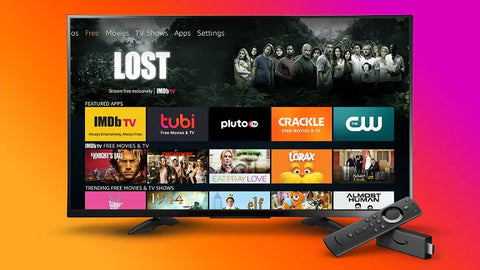
Connect Wireless Headphones to Fire TV


Metodo 1: connettersi direttamente al dispositivo di streaming Fire TV.


I modelli più recenti di Amazon Fire TV Stick e Fire TV Cube sono tutti dotati della funzione Bluetooth che ti consente di connettere UN paio di cuffie Bluetooth ad esso.

Per ottenerlo al menu Opzioni Bluetooth, dalla home page principale:

IMPOSTAZIONI > CONTROLLER E DISPOSITIVI BLUETOOTH > ALTRI DISPOSITIVI BLUETOOTH.
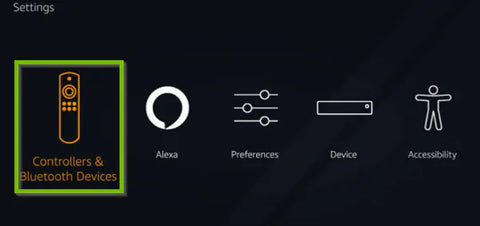
How to Connect Bluetooth Devices to Amazon Fire TV


Una volta impostate le cuffie Bluetooth in modalità di accoppiamento Bluetooth, queste dovrebbero essere visualizzate nell'elenco DISPOSITIVI RILEVATI e sarai in grado di selezionare per connettersi.

Questo è probabilmente il metodo più semplice e diretto per farlo e non disattiva gli altoparlanti della TV.

Tuttavia, se segui questo metodo, SOLO i contenuti di Fire TV arriveranno alle tue cuffie; se disponi di un altro dispositivo che inserisce contenuti nella TV (ad esempio un lettore Blu-Ray o un decoder via cavo), le cuffie non funzioneranno.

INOLTRE, Amazon Fire Stick (o Cube) ti consente di collegare solo UN paio di cuffie alla volta. Se desideri Collegare DUE cuffie contemporaneamente, dovrai seguire il Metodo 2.


Metodo 2: connettersi utilizzando un adattatore per trasmettitore Bluetooth (collegare fino a DUE cuffie).


Il metodo 2 può essere utilizzato su QUALSIASI TV: Smart TV, TV non Smart, schermo piatto, OLED... purché la TV disponga di una porta di uscita audio funzionante.

Inoltre, questo è il metodo che consigliamo per i televisori con Fire TV integrata (ad esempio Insignia o Toshiba.)

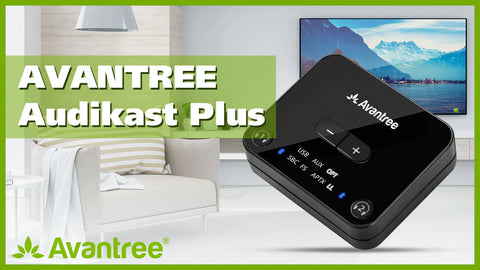
Gli adattatori Bluetooth possono essere facilmente trovati e acquistati. Assomigliano a questo:
 Bluetooth Adapter for Connecting Bluetooth Headphones to Tv

Bluetooth 5.0 Adapter for Connecting Wireless Headphones to any TV


Con un adattatore Bluetooth, potrai praticamente aggiungere funzionalità Bluetooth alla tua TV e connettervi le cuffie e/o gli altoparlanti Bluetooth della TV.

Altri vantaggi derivanti dall'utilizzo di un trasmettitore Bluetooth includono:

  • a. In grado di collegare due cuffie/altoparlanti Bluetooth contemporaneamente.
  • b. Nessun ritardo audio se utilizzato con cuffie che supportano aptX a bassa latenza .
  • c. Alcuni modelli supportano anche uscita audio simultanea attraverso le cuffie (che sono accoppiati al trasmettitore) E l'altoparlante TV esterno... "aggirando" così il problema per cui alcuni televisori vengono automaticamente disattivati ​​quando qualcosa viene collegato ai jack di uscita audio.


Configurare un adattatore Bluetooth è abbastanza semplice: collega l'adattatore Bluetooth alla porta di uscita audio della TV e Bluetooth "Accoppia" le cuffie Bluetooth all'adattatore.

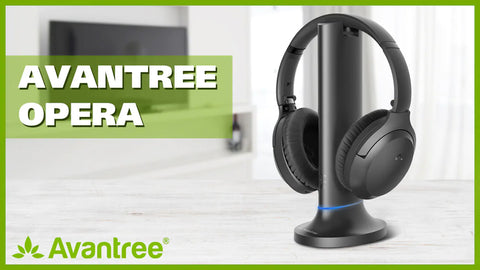
Se trovi difficile questa procedura, alcuni produttori l'hanno resa semplice fornendo Cuffie + Combo adattatori.

Con una combinazione come questa, non solo risparmierai lo sforzo di dover acquistare l'adattatore e le cuffie separatamente, ma salta anche la famigerata procedura di abbinamento delle cuffie all'adattatore.

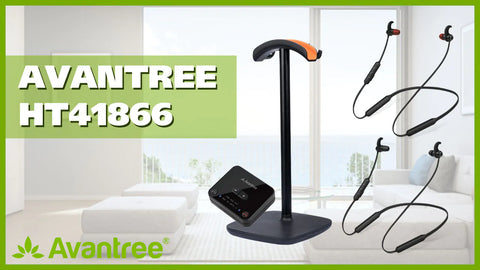
Inoltre, nel caso ci sia un'altra persona che ha bisogno dell'aiuto delle cuffie nelle tue per uso domestico, sono disponibili modelli di cuffie wireless doppie, che consentono condividi l'esperienza con un partner.

Tuttavia, se desideri Collegare più di due paia di cuffie, puoi Dovrò optare per una soluzione diversa. Vedi Come collegare più di due paia di cuffie a una sorgente.


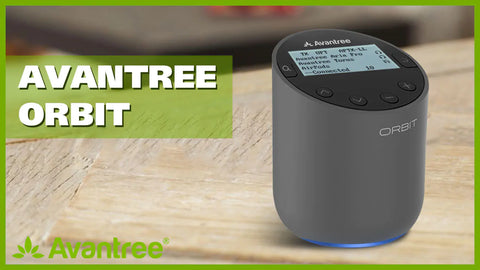
Set cuffie Bluetooth + adattatore
iWireless Headphones for Smart TV


Cuffie wireless doppie + set adattatori
Two Headphones on One TV


Se non viene emesso alcun suono dalle cuffie Fire TV, puoi provare a risolvere il problema qui: Amazon Fire TV nessun suono, cosa fare?


Metodo 3: connettiti utilizzando il Bluetooth integrato della TV (SE la tua TV ne è dotato).


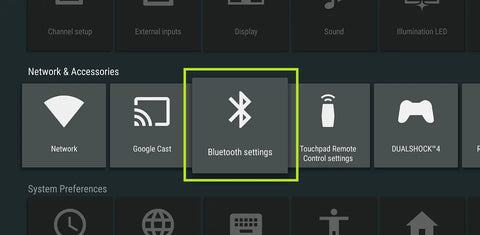
Se la tua TV è dotata di Bluetooth integrato, potrai trovarlo nel menu delle impostazioni. Se è lì, dovrai mettere le cuffie in modalità di accoppiamento Bluetooth e trovarle nel menu Bluetooth della tua TV.Una volta visualizzato, selezionalo nel menu per connetterti.
TV with Bluetooth Built-in


Se non sei ancora sicuro che questo sia ciò di cui hai bisogno, non esitare a contattarci all'indirizzo support@avantree.com , faremo del nostro meglio per aiutarti.


Potrebbe interessarti anche:

Cuffie wireless doppie per TV


Come risolvere il ritardo audio Bluetooth.


Quali sono le migliori cuffie per la TV?


Utilizza le cuffie Bluetooth insieme a una soundbar/altoparlante esterno

Articolo precedente
Articolo successivo

1commento

22 Apr 2025 Lynne Petherick
Had blue tooth headphones for dad’s Fire Tv in the nursing home. Never worked last pair we had were Sony with Alexa built in and they would unpair every time you charged them or turned them off for the night. The sound was controlled by a volume dial that was difficult of him to see and manipulate. I had to put tape on power button etc. He doesn’t know how to pair things, use settings or even apps. I was told by someone at Amazon to get the Avantree HT5009 Plus – [2025 Upgraded] Bluetooth 5.3 Wireless Headphones for TV Watching with Transmitter & Charging Dock, Pass-Through Support, Clear Voice Mo for him. Two hours on the phone. Then a girl said they won’’t work and have to be paired every time charged or turned off and on. Just the way blue tooth is with Fire TV 4K 2024 release. I know nothing about tech but don’t think this should be the case. She said would have to get wired head phones. Can’t have long cord running across floor of nursing home. Hazzard. He likes a charging dock and not the plug in because he can’t see the hole to plug it in. He wants the dock by his bedside table because it is hard for him to reach up to the dresser to put the head phones on to charge if it is on dresser underneath table. Would like them on his bedside table. I had too many Amazon devices going and computer programer told me to get rid of speakers etc and watch TV from apps on TV and put music on Amazon music so don’t have to keep pairing and unpairing which he cannot do. We have went through 4 sets of headphones already. Amazon says they have very few options that are compatible with the Fire TV. Isn’t that ridiculous. I only got that TV because of Alexa voice control because dad can’t see very well and wanted him to control it with his voice. Alexa is not turning up the volume or going to program he wants because he cannot see the buttons or the directional circle and select button. I put tape on those as well. Amazon Accessibility takes no responsibility for a company with so much money not having accessible products for the disabled and elderly. I was wondering if the headphones suggested above by an Amazon manager will work with Fire TV?? After 2 hours on the phone I thought he must know what he his talking about. Then a girl told me they had to be wired to work. I explained in a nursing home a cord running across the floor is not permitted. They would not price match or offer any type of discount after all the trouble we have had trying to get an 84 year old his first pair of headphones, first smart TV and he knows nothing about apps. He is having real trouble trying to run the TV himself. Can’t believe Amazon has hardly any headphones that are compatible with the Fire Tv and Alexa. Would rather not buy from them if don’t have to. Don’t trust they know what they are talking about. I would like the on/off buttons to be large and easy to see. I will pair them for him but don’t think they should be repaired every time they are charged and turned off for the night. I had got the pop speaker so he could save some music but this didn’t work because had to repair every time used different device. Going to pair headphones to TV so he can watch programs and put Music on Amazon music so they should stay paired to one device. Would like the volume button or buttons easy to see and big enough for his large hands numbed by years of work to be able to be felt and be easily accessible. He can’t see well at all and are waiting for appointment with low vision therapist to get some visual aids. He says he won’t read but I wondered if he got a tablet or kindle he could make the print large to see it or maybe an audio book> I guess headphones would have to be repaired in this instance and he does not know how to get into settings let alone pair. I want him to be able to watch his Western movies and listen to his country classic music and if lucky get him to read or listen to a book. Could you please tell me with a definate answer whether theses headphones will work with a Fire TV 4K 2024 realease. Amazon doesn’t seem to know. I would buy them from you but worried about the return if needed and not haveng a free return label. That is how Amazon gets you. I am thoroughly disgusted with Amazon and spoken or yelled at so many managers and supervisors that I threatened to take the whole system off the wall and return the whole system. They even sent the return labels past the return window date. Samsung has better accessibility features but the remote is even smaller and there are no larger universal remotes with voice control. Would someone at your company please give me an informed answer please. I have to order the headphones today as I returned the Sony after a big fight with Amazon and Sony so dad has no headphones at all. I am sure you can see the difficulty of the situation because I don’t know much about tech so am really not help to him. I am so angry after all Amazon has put us through since we bought the Fire Tv and the voice remote pro I am still tempted to take it off the wall and return it. But in reality there is no other option. Alexa won’t even turn the volume up and down now. I wanted him to have an enjoyable time to watch Westerns or listen to music it pass the time and tune out his revolting neighbour. I have no idea how to make this any easier for him. I am hoping the low vision therapist can put some dots or something on headphones and remotes that won’t fall off becaue blind people use them. Don’t know if brand alone matters to being compatible with Fire TV or if it has to be compatible with Alexa too?? I wish you were able to answer all my questions because I am sick of talking to the people at Amazon who either don’t know what they are talking about or each person has a different answer. I am asking for help for a reason or I would choose them myself. The only other reason to order from Amazon if I have to because they will come through the Canadian division so if have to return get a return label for free in Canada. Most companies are American so returning would be expensive and such a hassle. I would love some advice please ASAP because I need to order them in the next couple of hours. I don’t even think they will take a coupon. I am at the end of my rope and don’t know what to do? Could you please help me. Lynne Petherick lynepetherick@gmail.com 613-847-2490 Please let me know as quickly as you can. I have to order them in the next couple of hours.

Lascia un commento

Tutti i commenti del blog vengono controllati prima della pubblicazione

Grazie per esserti iscritto!

Questa email è stata registrata!

Acquista il look

Scegli Opzioni

Modifica opzione
Back In Stock Notification
this is just a warning
Login
Carrello della spesa
0 elementi