

PS5 コントローラーを PC に接続するにはどうすればよいですか?
PCでPS5コントローラーを使用できますか?
PC に Bluetooth が組み込まれていない場合でも、PS5 コントローラーを Windows PC または Windows ラップトップに接続することは絶対に可能です。
PC/ラップトップに既に Bluetooth が組み込まれている場合-inでは、PS5デュアルショックコントローラーを直接接続できるようになります。一方、PC に Bluetooth が搭載されていない場合は、データ接続をサポートする Bluetooth トランスミッター アダプターが必要になります。
これらの方法は PS4 コントローラーでも同様に機能します。
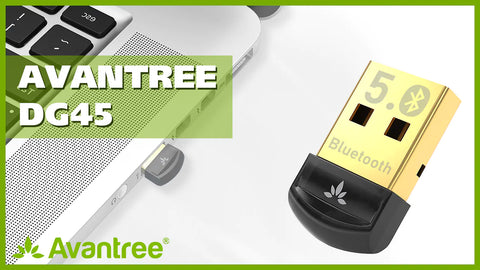
Bluetooth アダプターはデータ接続をサポートします (Windows のみ):
ただし、PC/ラップトップで使用する場合、PS5 コントローラーの機能の一部が利用できない場合があることに注意してください。
Bluetooth 内蔵 Windows PC
Windows PC にすでに Bluetooth が搭載されている場合は、次の手順に従ってください。
ステップ 1: 「Option」ボタンと「PS」ボタンを同時に押して、PS5 コントローラーを Bluetooth ペアリング モードにします。コントローラーのLEDインジケーターが2回点滅するまでの時間白.
:max_bytes(150000):strip_icc()/002-sync-ps5-controller-5087332-e4d80e001c0c4743a19ac06baba0131b.jpg)
ステップ 2: PC の Bluetooth メニューで、「ワイヤレス コントローラー」を検索して選択し、接続します。
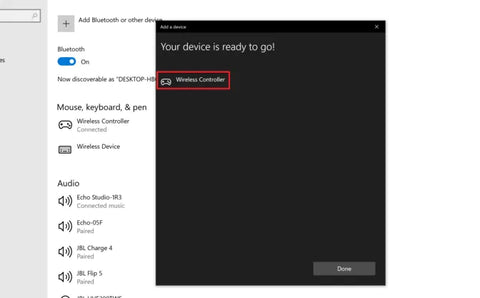
もう大丈夫です。
Bluetooth を搭載していない Windows PC
Bluetooth が組み込まれていない Windows PC の場合は、Avantree DG45 などの Bluetooth データ アダプタの助けが必要になります。 .
ステップ 1: アダプターを PC の USB ポートに差し込みます。
ステップ 2: Bluetooth アダプターのドライバーを PC にインストールします。このようなアダプターでは通常、ドライバー ソフトウェアをダウンロードしてインストールする必要があります。ユーザーマニュアルの指示に従ってインストールしてください。
ステップ 3: PS5 コントローラーを Bluetooth ペアリング モードにしますコントローラーの LED インジケーターが 白 で 2 回点滅し始めるまで、「Option」ボタンと「PS」ボタンを同時に押し続けます。
ステップ 4: PC の Bluetooth メニューで、「ワイヤレス コントローラー」を検索して選択し、接続します。
これで準備完了です。
ビデオで学習したい場合は、こちらをご覧ください。
さらに質問があります? 以下のコメントセクションに記入するか、support@avantree.com までお気軽にメールしてください。できるだけ早く折り返しご連絡させていただきます。
あなたも興味があるかもしれません...
PS5 に Bluetooth ヘッドフォンを接続する方法?
AirPods を PS5 に接続する方法?
Bluetooth ヘッドフォンを PS4 に接続する方法?


 Pay $0 today
 Trial
Trial
 Pay
Pay