Turn off the transmitter
Keep it off during direct TV pairing.

Interactive user guide
Connect by Optical or AUX, then listen through the included Loop earbuds. Or pair the earbuds directly with a Bluetooth TV.
 Transmitter
 Earbuds
 Auracast TV audioPhone Bluetooth too
The included Loop earbuds connect to the transmitter automatically. No Bluetooth pairing is required.
Use the included USB-C cable.
Check the labels beside the ports, then choose the first match below.
Choose your cable in Step 2 to see the matching TV settings.
Why PCM? PCM is an audio format the transmitter supports.
Choose your TV brand:
No PCM setting is needed. TV speakers may stay on or mute automatically.
Use this route only when your TV supports Bluetooth audio.
Expect more audio delay. If voices do not match the picture, use the recommended Aura Loop transmitter instead.
Keep it off during direct TV pairing.
Turn on the earbuds. Hold the manual-pairing / play button for 3 seconds until the LED blinks red and blue.
Open the TV Bluetooth audio list and select Avantree Loop.
Wait for the LED to become solid blue or purple, then play a program and adjust volume with + / −.
Success: solid blue or purple LED + TV soundThe earbuds are connected directly to the TV.
Setup Complete →TV has no Bluetooth audio?
No earfins in the box?Contact us for a free pair →
While audio is playing, short-press the earbud power button. Each press switches to the next mode.
Stop when you hear the mode you prefer.
Use Avantree–Avantalk for more EQ options and custom sound adjustments.
See EQ steps in the FAQ →Keep charging contacts dryEarbuds + charging dock
After USB-C charging: the earbuds power on automatically when unplugged.
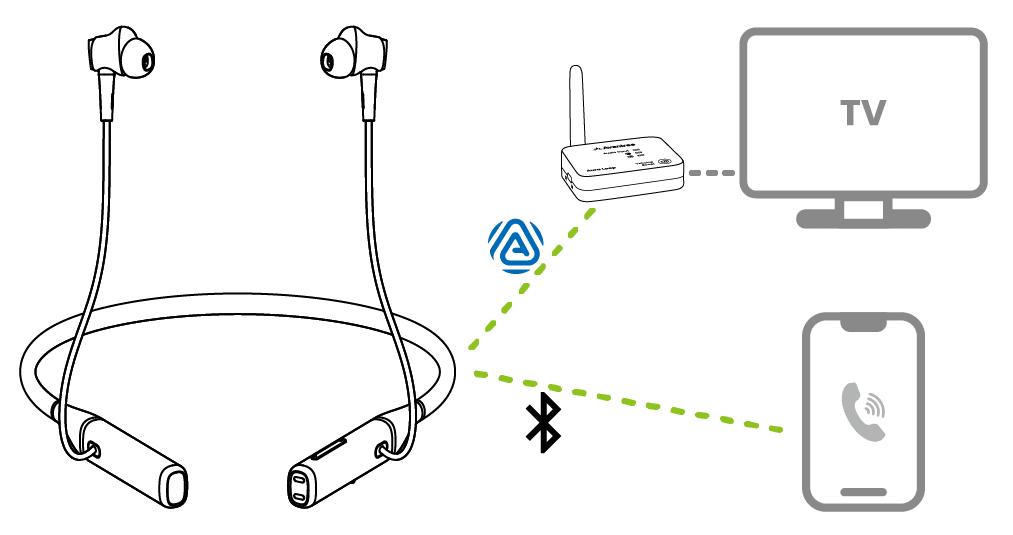
Additional compatible Avantree Auracast devices can join by powering on. Other brands may require their companion app.
Add more earbuds →Use Avantree Updater on a Windows PC or Mac. Finish both firmware updates first.
Do not interrupt the update. Keep the earbuds near the phone until the update reaches 100%.
2 · TRANSMITTER
Download the Firmware Update Tool on a Windows PC or Mac.
Connect the transmitter to your computer with a USB data cable.
Firmware update cable: Use the gray-tip cable (a USB cable that supports data transfer) that came with your device.
Mac users can also use an Apple charging cable.
Open the Firmware Update Tool.
Follow the on-screen instructions.
Keep transmitter connected until it says Complete.
After updating: unplug the transmitter.

