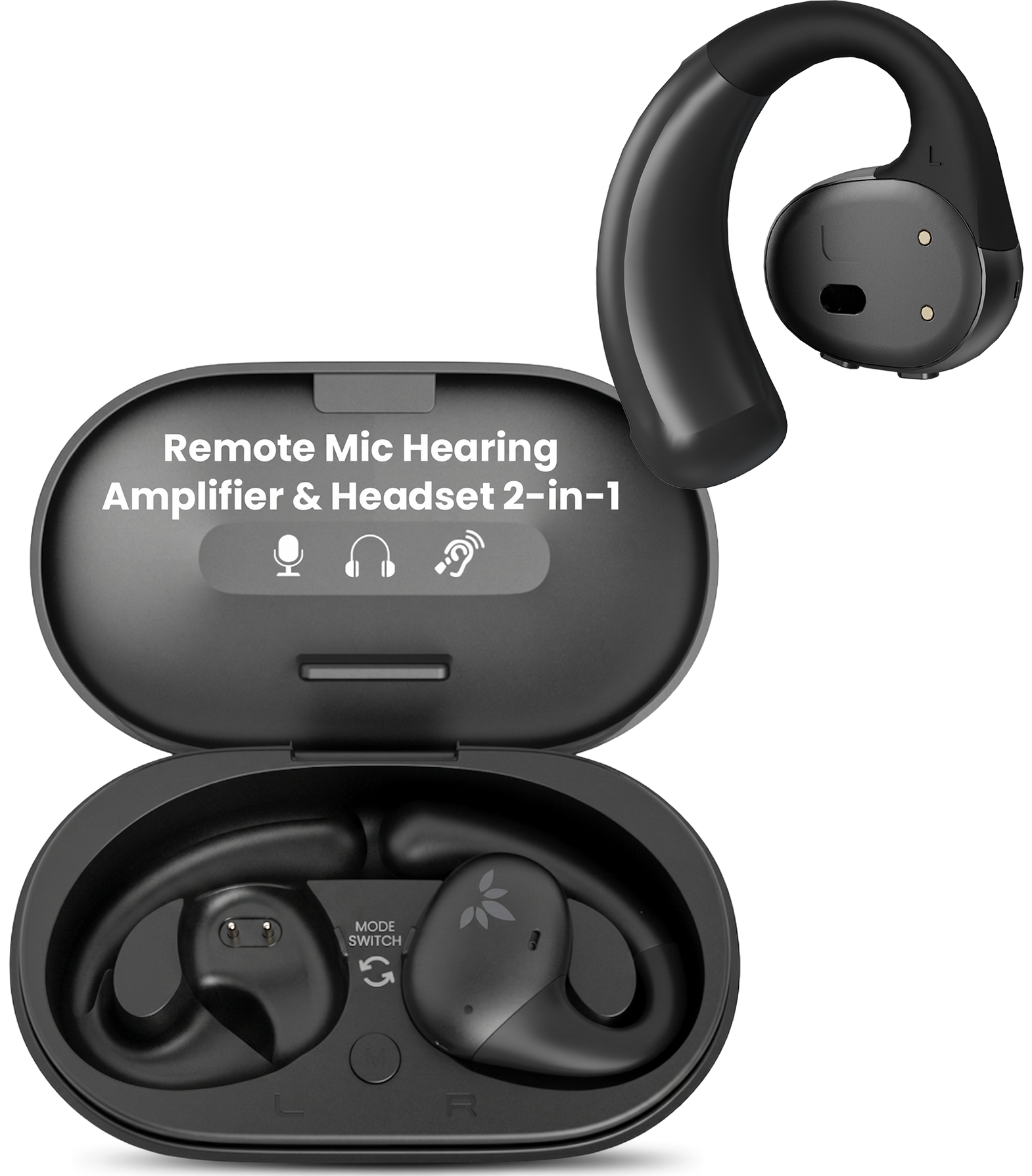
INTERACTIVE USER GUIDE · ACUEAR PEBBLE 2 / PHA-126M-2

Hear conversations more clearly.

Wear the open-ear headphones.
The case becomes your remote microphone.

AcuEar Pebble 2 open-ear headphones and remote microphone charging case

FIRST-TIME SETUP

Activate the headphones.

Do these four steps once.

First, remove both protective films.They cover the charging contacts.
Leaving them on prevents activation.
  1. Remove both protective films.Check the metal contacts.
  2. Put both headphones in the case.Seat each one fully.
  3. Close the lid.Wait 5 seconds.
  4. Open the lid. Remove both headphones.They connect to the case mic automatically.

Success: You hear the sound picked up by the case.

No sound? Repeat steps 2–4.

Prefer to watch?

Choose the action you need.

Connect to the case micActivate and reconnect the set.
Wear the headphonesFollow the curve of your ear.
Charge the setSee the correct charging position.
Next: choose how you will listen →

HEARING ASSIST MODE

Put the case near the speaker.

The microphone is inside the case.

NOISY · ONE TO ONE

Give the case to the speaker.

Ask them to hold it near their mouth.

Within 40 cm / 16 in.
Driver points the AcuEar Pebble 2 remote case microphone toward a drive-thru worker

DRIVE-THRU · ONE TO ONE

Point the case at the worker.

Hold it safely toward the window.

Closer is clearer.
AcuEar Pebble 2 remote case microphone placed near speakers at a meeting

MEETING · SEVERAL SPEAKERS

Place the case on their table.

Face it toward the speakers.

Keep speakers within 1.5 m / 5 ft.
Keep the case and headphones within 15 m / 50 ft.At 20 m / 66 ft—or through walls—sound may cut out.
Next: choose a listening mode →

CHOOSE A MODE

What do you want to hear?

Choose one. Its instructions will open immediately.

Next: adjust the volume →

ADJUST VOLUME

Change it one level at a time.

Use the buttons on either headphone while wearing it.

  1. Wear the headphones.Volume only changes while they are being worn.
  2. Press + or − once.Do not hold the button.
  3. Repeat slowly, one press at a time.Wait for the level to change before pressing again. Choose from 16 levels.

Success: Each press changes one level.

Hear a tone? You reached minimum or maximum volume.

FIX A PROBLEM

What is happening?

Open the symptom that matches what you see or hear.

No sound from the case mic

Do this:

  1. Remove both protective films.
  2. Put both headphones in the case.
  3. Close the lid for 5 seconds.
  4. Open it. Remove both headphones.

Expected: You hear sound from the case.
If not, open the reset steps below.

Sound cuts out

Do this:

  • Stay within 15 m / 50 ft.
  • Move away from walls, metal, and interference.
  • Move the case closer to the speaker.

Expected: Steady speech without dropouts.

Bluetooth cannot find the headphones
  1. Hold the case power button for 6 seconds.
  2. Wait for red and blue flashes.
  3. Turn off Bluetooth on previously connected devices.
  4. Scan again.

Expected: Pebble 2 appears in the device list.

Volume does not change
  • Wear the headphones.
  • Press + or − once. Do not hold.
  • Repeat separate presses.
  • Listen for the end tone.
Reset the case mic and headphones
  1. Open the case. Hold the case power button for 3 seconds until its LED flashes red and blue.
  2. Double-press the case power button. Solid pink for 2 seconds means reset complete.
  3. Remove both headphones. While their LEDs flash red and blue, hold + and − together on either headphone for 5 seconds. Both show solid pink for 2 seconds.
  4. Return both headphones to the case and close the lid. Open it again to reconnect automatically.

This clears saved Bluetooth pairing information.

REFERENCE

Buttons, modes, charging.

Case microphone

Power
Hold 6 sec: on/off
Reset
Hold 3 sec, then double-press
Environment
Normal / Noisy
Mic pickup
Omnidirectional

Headphones

+ / −
Single-press: volume
+ and −
Hold 5 sec: reset
Volume
16 levels; end tones
Mono use
Either side works alone

Power & range

Charging
About 2.5 hours
Hearing mode
About 10 hours
Bluetooth mode
About 18 hours
Stable target
About 15 m / 50 ft or closer

STILL NEED HELP?

Get the right help for AcuEar Pebble 2.

Select AcuEar Pebble 2 / PHA-126M-2. Include the mode, LED pattern, distance, and what happened after closing and reopening the case.

RECOMMENDED

Submit an AcuEar Pebble 2 support ticket

Add photos or screenshots if needed. The form routes your question to the product team.

Start support request →

DON'T WANT TO SUBMIT A TICKET?

Talk to a real support agent.
