Best for
- Auracast assistive listening in public venues and larger rooms
- Compatible Auracast hearing aids and receivers
- Optical, AUX, or Bluetooth audio input from a phone or computer


Long-Range Auracast Audio Transmitter
Best for
Check before buying
Before buying
Check the TV audio output, listener technology, and simultaneous-speaker needs before purchase.
For Optical/TOSLINK connections, set the TV digital audio format to PCM or Stereo unless the product page says otherwise.
| Audio input | ||
|---|---|---|
| Optical / TOSLINK | Supported | Use PCM/Stereo digital audio. |
| 3.5 mm AUX | Supported | Connect to an analog audio output. |
| Bluetooth from phone or computer | Supported | Bluetooth is used as an input source. |
| Wireless output | ||
| Compatible Auracast hearing aids and receivers | Supported | Broadcast to multiple compatible listeners. |
| Classic Bluetooth-only headphones | Not supported | The wireless output is Auracast broadcast audio. |
| Non-Auracast hearing aids | Bridge required | Use a compatible Auracast receiver such as AuraCoil. |
Compatible listening devices for this transmitter.
Use only when the TV or listener needs another connection path.
Optional replacement connection and power accessories.
Packaging list pending confirmation.
No. Oasis Aura broadcasts Auracast audio; the listening device must support Auracast or use a compatible bridge receiver.
Compatible Auracast hearing aids can join directly. Other hearing aids need a compatible receiver such as AuraCoil.
Yes. Bluetooth can be used as an audio input from a compatible phone or computer.
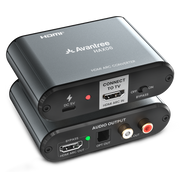
No. HDMI-only sources need a compatible audio extractor.
| Buying difference | ||
|---|---|---|
| Best for | Venues and larger rooms | Home TV listening |
| Wireless output | Auracast | Auracast or one Bluetooth listener |
| Range | Up to 330 ft / 100 m | Up to 330 ft / 100 m |
| Bluetooth audio input | Yes | No |
| Optical / AUX | Yes | Yes |

 Assistive Listening
 Instant Venue Audio
 Guided Tour